MOONDAW est un firmware pour le M-VAVE FM-1 : il remplace celui
de la machine et en fait un tracker complet — huit pistes, des instruments
qui se fabriquent, des morceaux qui sont des fichiers texte. Le firmware
est en bêta : il tourne tous les jours sur un vrai FM-1, mais il
n'est pas encore passé entre beaucoup de mains.
Les gestes et les pages d'effets de ce manuel ne sont pas
écrits ici : ils sont lus dans le firmware. Ce que vous lisez dans les
encadrés LA MACHINE DIT est mot pour mot ce que l'écran HELP
affiche — et en anglais, parce que la machine parle anglais. Traduire ces
lignes inventerait un MOONDAW qui n'existe pas.
La machine
Le FM-1 est un synthé de poche : un écran de 240 × 240, vingt-sept
touches de F3 à G5, douze boutons en deux rangées de six, quatre
encodeurs KNOB 1 à KNOB 4, trois autres
— SELECT, PRESETS, ALGORITHM — et
le potentiomètre MASTER. Dedans : 512 Ko de RAM et pas de
virgule flottante. MOONDAW tient là-dedans.
Deux boutons valent dans tous les écrans. HOME remonte d'un
cran, et maintenu ramène au menu depuis n'importe où. GLO
ouvre les réglages du morceau, FX la table de mixage. Les
boutons qui font quelque chose sur l'écran où vous êtes
s'allument : c'est le manuel de la machine, et SETTINGS peut
l'éteindre.
Les gestes qui valent partout
La machine dit
KNOB 1, KNOB 2
move: row, column
KNOB 3, KNOB 4
change
SELECT
row, onto its number
SEL
into what is under
HOME
back
HOME held
the menu, from anywhere
GLO
the project
ALGO
undo left, redo right
EDIT held
black keys: commands
lit buttons
what this screen does
SAVE
save the project
PLAY
play, stop
Les écrans
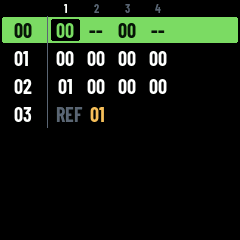
Un morceau est fait de phrases ; dans une phrase, chaque piste
joue un bloc ; un bloc est une suite de steps. Les trois
écrans principaux sont ces trois niveaux, et on descend de l'un à
l'autre avec SEL, on remonte avec HOME.
HOMELe menu : reprendre le projet ouvert, la liste des
projets, les réglages, l'état de la machine, l'aide.
SONGdepuis HOMEL'arrangement : une ligne par phrase,
une colonne par piste, et dans la case le bloc que cette piste joue.
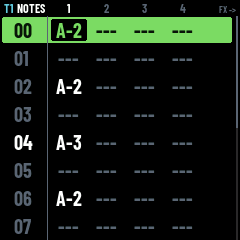
SECTIONSEL sur le numéroLa même grille tournée vers les
steps : une ligne par step, une colonne par piste, la note jouée.
PATTERNSEL sur une caseUn bloc d'une piste, en trois
vues — les notes, les effets, l'instrument.
INSTRUMENTENV depuis INSLe son lui-même : moteur,
enveloppe, filtre, niveau, couches.
MIXERFXLes huit pistes : volume, panoramique, départs
réverbe et écho ; au-dessus, les deux retours.
PROJECTGLOCe qui vaut pour tout le morceau : nom,
tempo, swing, mesure, durée d'un step, nombre de pistes.
HOME
Le premier écran. CONTINUE reprend le projet ouvert — son nom est
écrit à droite, avec un point ambre tant qu'il reste des modifications
non enregistrées. PROJECTS liste les projets de la mémoire flash
(la machine en tient trente et un) ; EDIT sur l'un d'eux le
renomme, le duplique ou le supprime. SYSTEM dit ce qu'il reste de
place, HELP ouvre l'aide, et SETTINGS les réglages de la
machine. C'est aussi le seul écran où la machine accepte un morceau ou
une banque de samples envoyés depuis un ordinateur.
La machine dit
SELECT, KNOB 1
move
SEL
go: CONTINUE, PROJECTS...
SYSTEM
flash left, version, CPU
PLAY on CONTINUE
play the open project
in PROJECTS: SEL
open the project
in PROJECTS: PLAY
play it, staying here
in PROJECTS: EDIT
rename, duplicate, delete
HOME
back to the menu
SONG
L'arrangement, et la forme du morceau. Une ligne par phrase, son numéro
fixé à gauche, puis le bloc que joue chaque piste — six pistes à
l'écran. KNOB 3 sur une case change le bloc ; un cran après
le dernier en crée un neuf, et ce qu'il désigne se fait entendre tout
seul dès que la main s'arrête, sauf si le morceau est en train de
jouer. KNOB 4 règle le niveau de cette case dans cette
phrase. EDIT ouvre une sélection de blocs — ou de phrases
entières si le curseur est sur le numéro — que OP1OP2OP3 copient, collent et coupent.
SONG, tel que la machine le dessine
La machine dit
SELECT
phrase, onto its number
KNOB 1
phrase
KNOB 2
track
KNOB 3 on a cell
its pattern
at rest
it plays by itself
past the last
a new pattern, NEW
KNOB 3 on a number
the phrase's length
KNOB 4 on a cell
its level in the phrase
SEL on a cell
edit the pattern
SEL on a number
the section
EDIT
selection, in and out
on a number
whole phrases
OP1 OP2 OP3
copy, paste, cut
OP4
clear
OP6
loop these phrases
OP6, none stretched
a loop's end, then other
EDIT held
black keys: commands
MONO
solo; held: mute
SEQ on a number
copy the phrase below
LFO on a number
delete the phrase: twice
keys
the track's instrument
OCT- OCT+
the keyboard's octave
FX
the mixer
GLO
the project
PLAY
the song, from the cursor
again
stop, the cursor there
ALGO
undo left, redo right
HOME
back to the menu
SECTION
La grille de SONG tournée vers les steps : une ligne par step, une
colonne par piste, et la note que cette piste joue à ce step —
cinq pistes à l'écran. C'est la vue où l'on écrit à travers les
pistes plutôt qu'à l'intérieur d'une seule : les touches posent la
note sous le curseur, SEL descend dans le bloc de la piste
pour y travailler en détail.
La machine dit
SELECT, KNOB 1
step
KNOB 2
track
keys
write the note
OCT- OCT+
the keyboard's octave
SEL, EDIT
the track's pattern
EDIT held + MONO
solo; held: mute
EDIT held + OP6
a loop's end, then other
FX
the mixer
GLO
the project
PLAY
the phrase, round
ALGO
undo left, redo right
HOME
back to SONG
PATTERN
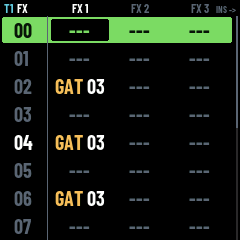
Un bloc, d'une piste, en trois vues qu'un bouton sépare :
SEQ les quatre notes d'un accord, FX les trois
effets, ENV l'instrument. Même grille dans les trois : une
ligne par step, son numéro à gauche, en blanc sur le temps. Dans la vue
des notes les touches écrivent — un accord tant qu'une touche reste
tenue ; ailleurs elles jouent sans rien écrire. Sur la vue INS, un
second ENV ouvre l'instrument qui sonne à ce step.
PATTERN, la vue des notes
La machine dit
SELECT
step, onto its number
KNOB 1
step
KNOB 2
column
KNOB 3
note, instr., effect
KNOB 4
an effect's value
SEQ, FX, ENV
notes, effects, instr.
ENV on instruments
edit the instrument
SEL on an effect
the syllable
SEL on instruments
choose an instrument
keys
write in a note column
keys elsewhere
play, write nothing
OCT- OCT+
the keyboard's octave
EDIT
selection, in and out
EDIT held
black keys: commands
OP1 OP2 OP3
copy, paste, cut
OP4
clear
OP6
loop the selection
OP6, no selection
a loop's end, then other
MONO
solo; held: mute
ALGO
undo left, redo right
PLAY
the phrase, round
again
stop, the cursor there
REC
armed: PLAY counts in
then keys
record; OFF when let go
GLO
the project
HOME
back
INSTRUMENT
Le son. Le nom d'abord, puis les réglages par ordre d'importance, ceux
qui vont ensemble sur une même ligne — et les noms de colonnes changent
avec la ligne :
SOUND — ENGINETIMBRE: le moteur et sa variante.
ENV — ATKDECSUSREL: l'enveloppe.
FILTER — CUTRESENVVEL: coupure, résonance, et de combien l'enveloppe et la vélocité l'ouvrent.
LEVEL — GAINLEVELVIB: le gain d'entrée, le niveau de sortie, le vibrato propre à l'instrument.
VOICE — TRACTACCENT: un instrument VOX seulement — la longueur du conduit vocal, et l'accent FR ou EN.
DRUM — TUNETONEDECAYSNAP: un kit DRUM seulement.
LYR n — une couche de plus sur le même instrument, avec son moteur, sa transposition et son gain. Jusqu'à quatre.
PLAY lance un aperçu — quelques notes qui montent, en boucle,
jusqu'au PLAY suivant — et les touches jouent le son tel
qu'il est en train d'être réglé.
La machine dit
SELECT, KNOB 1
row
KNOB 2
column
KNOB 3
value
PRESETS
another instrument
SEL on NAME
name it
keys
play it
OCT- OCT+
the keyboard's octave
PLAY
a preview
GLO
the project
ALGO
undo left, redo right
HOME
back to the pattern
MIXER
Une ligne par piste : VOLPANREVECH, exactement comme le fichier les écrit. Au-dessus de la
piste 1, hors de vue tant que le curseur ne monte pas, la ligne des deux
retours : ROOMDAMP pour la réverbe,
TIMEFB pour l'écho. KNOB 3 sur le
numéro d'une piste passe de normal à MUTE puis SOLO — un
état d'écoute, jamais écrit dans le fichier.
La machine dit
SELECT
track, onto its number
KNOB 1
track
KNOB 2
column
KNOB 3
value
KNOB 3 on a number
normal, mute, solo
MONO
solo; held: mute
EDIT, GLO
the project
SEQ
SONG
PLAY
the song
ALGO
undo left, redo right
HOME
back
PROJECT
Ce qui vaut pour tout le morceau : NAME, BPM,
SWING, METER (les temps d'une mesure),
STEP (ce qu'un step vaut en notation — une double-croche à
quatre steps par temps, un triolet à trois), TICKS (les
ticks d'un step, l'unité que comptent les effets) et
TRACKS.
La machine dit
SELECT, KNOB 1
setting
KNOB 3
its value
SEL on NAME
name the project
FX
the mixer
SEQ
SONG
PLAY
the song
ALGO
undo left, redo right
HOME
back
SYLLABLE
L'éditeur de syllabe du moteur VOX, ouvert par SEL sur un
effet SYL. Deux façons d'écrire : au clavier — les touches
blanches donnent les consonnes, les noires les voyelles — ou à la
molette, slot par slot. PLAY la fait chanter, SEL
l'écrit dans le step, HOME ressort sans rien écrire.
La machine dit
PRESETS
keys or wheel
KEYS: white keys
consonants
KEYS: black keys
vowels
KEYS: OCT
the other signs
KEYS: LFO
rub the last out
KEYS: ARP
weak (.)
WHEEL: KNOB 2
the slot
WHEEL: KNOB 3
its sign
WHEEL: LFO
empty the slot
PLAY
sing it again
ALGO
undo left, redo right
SEL
write it in the step
HOME
back, nothing written
SETTINGS depuis HOME
Les réglages de la machine, pas du morceau : ils ne voyagent pas dans
le fichier. LEDS — éteintes, l'état, ou le guide qui
allume les boutons utiles. LIGHT, la force de ce guide.
COUNT-IN, les mesures décomptées avant que
REC commence vraiment à enregistrer.
La machine dit
SELECT, KNOB 1
setting
KNOB 3
its value
LEDS
off, state, guide
LIGHT
how bright the guide
COUNT-IN
bars before REC records
HOME
back, kept
SYSTEM depuis HOME
Ce qu'il reste : la place libre dans la mémoire flash, le nombre de
morceaux et ce qu'ils pèsent, la banque de samples et ce qu'elle pèse,
la version du firmware et la charge maximale du processeur. Un sample de
plus est un morceau de moins — les deux partagent la même flash, et
cette page est l'endroit où on le voit.
Les moteurs
Un instrument choisit un moteur et une variante
(TIMBRE), puis passe par la même chaîne : enveloppe,
filtre, niveau, départs vers la réverbe et l'écho, limiteur final.
Six moteurs.
PULSE 4 variantes
L'onde carrée des puces de jeu, et les formes plus fines et plus
nasillardes à côté d'elle : 12,5 %, 25 %, 50 %, 75 %. L'effet
DUT change cette largeur step par
step, par-dessus l'instrument.
NOISE 2 variantes
Le bruit du même silicium, un registre à décalage : LONG
siffle, SHORT est métallique et tonal. De quoi faire
charlestons, caisses claires et vent.
WAVE 5 variantes
Une table d'onde de 4 bits : SAW, TRI,
SINE, HALF, ABS. L'effet
WAV change la forme step par step,
comme DUT le fait pour PULSE.
SMPL vos samples
Les sons courts de la banque, préparés et envoyés depuis l'ordinateur
(plus bas). Des zones
étalent les samples sur le clavier : chacune dit quelles notes elle
couvre, quel sample elle joue et à quelle hauteur il a été enregistré.
Les zones voyagent dans le fichier du morceau, les samples non — un
morceau les appelle par leur nom.
VOX 5 styles
Une voix chantée, qui prononce les syllabes écrites dans les steps avec
l'effet SYL. Cinq styles —
GLIDE, HARD, SOFT,
MELO, SINGR — plus la longueur du conduit
vocal (TRACT, du grave au perché) et l'accent, français ou
anglais. Les consonnes frappent à l'attaque, la voyelle tient tant que
la note tient, la suite se prononce au relâchement.
DRUM 10 kits
Les voix de batterie de Felucca, le firmware ouvert sur lequel MOONDAW
est construit : STD, ROUND, 80,
10, 66, 55, 77,
DEEP, TIGHT, PERC. Un kit
s'étale sur le clavier aux notes de la convention General MIDI, et
TUNETONEDECAYSNAP le règlent d'un bloc.
Les effets de step
Chaque step porte jusqu'à trois effets, écrits en mnémoniques et
jamais en hexadécimal : la ligne se lit. Ce sont eux qui décident de
tout ce qu'une note ne dit pas — quand elle part, combien de temps elle
dure, à quel point elle est jouée fort, où elle est placée, ce qui
glisse, ce qui tremble.
Deux familles, et la différence compte : un setter est écrit une
fois et tient jusqu'à ce qu'on le change — y compris d'un tour de boucle
à l'autre, ce qui vaut la peine de l'écrire au step 00 ; un
one-shot meurt avec son step. Chaque page le dit.
PRB n'existe que sur le FM-1 : les autres MOONDAW ne
l'ont pas, et un .trk qui l'écrit leur revient sans cette
case.
PATTERN, la vue des effets
La machine dit
DLYhold to tick N
Holds this step's note-on until tick N. The note then falls between two steps, which is how a triplet or a pushed beat is written.
Only the note waits: the other FX of the step are read on time, so a VOL beside it is already set when the note finally fires.
Dies with its step.
CUTnote off, tick N
Releases the track's voices at tick N of the step, whether this step played a note or not. On a step with no note it ends whatever is still sounding, which is what makes it a rest.
It names a MOMENT, not a length. Under a DLY it can fire before the note it was aimed at, and then it never touches it. GAT is the one that counts from the note.
Dies with its step.
GATlasts N ticks
How long the note lasts, in ticks, counted from its own note-on.
Unlike CUT it follows the note: the same value is the same length wherever DLY put it, so a staccato passage survives a change of placement and its cells stay identical.
Every retrigger of RET is a note-on too, so RET03 GAT01 is two short attacks with a hole between them.
The release may land in the next step. 00 turns it off, and a step with no note has nothing to count from.
RETretrigger N ticks
Retriggers this step's note every N ticks. On a step with no note it retriggers the one still sounding.
Each attack ends the one before it, so the repeats come out joined end to end. Add GAT for a gap between them.
Dies with its step.
STRspread, N ticks
Spreads the notes of this step, N ticks apart, instead of starting them together. A strummed guitar at 01 or 02, a rolled chord slower, and on two notes the little grace note ahead of a big one.
It carries no direction: the order is the order the notes are written, N1 first. The same chord entered the other way round is the other stroke.
The chord is entered once, by the first note, so GAT releases all of it together — a hand damping a strum stops every string at once — and RET restrums the whole thing.
What is left of it may run past the step. The next step that carries a note ends it, and so does an OFF; over an empty step it carries on. Nothing to spread under ARP, which is monophonic.
VOLfader share, 00-7F
A SHARE of the track's mixer fader, 00 to 7F: 7F is the fader as it stands, 40 is half of it. The two multiply, so turning the track down in the mixer turns down everything the steps wrote and no step needs editing again.
A mixing level the arrangement owns, not a nuance of the playing: it moves what is already sounding, so it rides the fader on a step with no note.
A setter. Written once, it holds until it is changed — including across the loop of the pattern, so write it at step 00 when it matters. Playback starts at 7F: the mixer, untouched.
VELhow hard, 00-7F
How hard the notes are PLAYED, 00 to 7F. It multiplies with VOL rather than replacing it, and it reaches only the notes that come AFTER it: a note already sounding does not change.
That is the whole difference with VOL, which sits one letter away in the same column. The mixer is the fader, VOL is the ride on it, VEL is the hand.
It also opens the filter, by the amount the instrument's VEL knob asks for. A setter.
PAN00 left, 7F right
Where the track sits across the stereo field. 00 hard left, 40 centre, 7F hard right.
A setter, like VOL and REV: the three are what the mixer says about a track, and none of them is re-decided under every note.
REVreverb send 00-7F
How much of the track is sent to the ONE reverb, 00 to 7F. Around 20 is already the amount a record has.
Post-fader: the send is taken off what the track actually puts out, so turning the track down with VOL takes its room down with it.
The room itself — its size, its damping — belongs to the song and lives on the SONG screen. A setter.
ECHdelay send 00-7F
How much of this track goes to the ONE delay, 00 to 7F. Dry at 00, which is where every track starts.
Beside REV because it answers the same kind of question — how much of this track is heard somewhere other than dry — and a setter for the same reason: an amount of echo is written once and holds.
The delay ITSELF is on the SONG screen: how far apart the repeats fall, in TICKS so they land on the grid and follow the tempo, and how many of them there are. One delay for the whole record, and no step has any business rewriting it mid-bar.
Called ECH because DLY is already the note-on hold, and two commands starting with the same letters is a mistake per session on a machine with no manual.
Post-fader, like the reverb send: turning a track down turns its echoes down with it. The repeats ping-pong across the stereo field and darken as they go.
DUTpulse duty 0-3
Pulse width, 0 to 3, overriding the instrument. It is what tells a square from the thinner, more nasal shapes.
Speaks only to a PULSE voice: on a noise or a sample instrument it is inert rather than meaning something else. The setting is still remembered — the next note may well be a pulse.
A setter. WAV is the same idea for the wave engine.
BPMtempo, all tracks
Tempo, 20 to FF, for the WHOLE song and not just this track.
It counts ticks, not beats: a step lasts ticks_per_step of them, so what a step is worth musically depends on both. Doubling the ticks of a step halves the tempo unless BPM follows.
A setter, and the one whose reach is the song rather than the track.
TSPsemitones, 40 = 0
Transpose, in semitones, 40 = none. Below 40 goes down, above goes up — 3C is three semitones flat, 44 is four sharp.
It shifts the notes as they are played, so the pattern keeps saying what it says and a section can carry it into another key.
A setter, like the rest of the pitch family.
SLIglide, 00 = jump
Glide to the note, in cents per tick. 00 jumps straight there, which is the normal way a note starts.
A glided note is TIED: the envelope keeps running instead of re-attacking — the note is reached, not struck. A note-off ends the phrase, so the note after one attacks again.
It slides FROM the note before it, so it needs one. SCP names its own starting point, can open a phrase, and strikes its note.
A setter, so a passage glides without rewriting it under every note. 00 turns it off.
VIBspeed x, depth y
Vibrato. TWO nibbles, not one number: x is the speed, y the depth, and each half is edited on its own.
The wheel keeps turning between notes unless the instrument asks for a fixed starting point, so a note meets the vibrato wherever it has got to. On notes shorter than one cycle that is the difference between a gesture into the note and a bend away from it.
A setter. 00 turns it off.
SWPsweep, 40 = none
Pitch sweep, in cents per tick, 40 = none. Below 40 falls, above rises.
This is what makes a kick: a steep fall over the first few ticks of the note. What it has bent is reset by each note-on, so it applies to every note instead of being rewritten under each.
A setter — a drum instrument carries its sweep. SCP is the one-shot for a single note.
SCPspeed x, semis y
Slide INTO the note. TWO nibbles: x is the speed, y how many semitones below it starts. SCP26 comes in two semitones low.
Unlike SLI it needs no note before it, which is the point: the first note of a phrase is exactly the one worth sliding into.
Upward only — a fall away from a note is SWP.
The one ONE-SHOT of the pitch family: a gesture on one note, not a way of playing a passage. It wins over SLI when a step has both.
ARPN ticks per note
Arpeggio over the notes ALREADY WRITTEN on this step, N ticks each. It carries no intervals of its own: they are the chord, readable on the row.
While it runs the step is monophonic: one voice sounds and moves. The same four notes give a held chord or an arpeggio of it, depending only on this.
It counts ticks rather than dividing the step, because a chiptune arpeggio is a timbre. Slower than that it is a broken chord, already writable as notes on steps.
A setter, 00 = off.
TRMVIB for the level
Tremolo: the level pulses. TWO nibbles like VIB, on VIB's clock: x is the speed and the same x is the same rate on both, y the depth — at F the dips reach silence.
The wave is not a sine but the lopsided throb of a bias tremolo, the wobble of an early-sixties amp: a quick rounded dip, then the sound lingers near the top. Slow and deep it breathes; fast and shallow it shimmers.
The wheel runs FREE and a note-on never resets it — that too is the amp, where playing does not restart the wobble. Every note catches the wave wherever it has got to.
A setter. 00 turns it off.
FLTcutoff, FF = open
Filter cutoff, 00 closed to FF wide open. The filter belongs to the shared chain, so this reaches every engine.
Named FLT and not CUT on purpose: CUT is already the note-off, and two commands starting with the same letters on a console with no manual is a mistake per session.
A setter. It survives the note-on that rebuilds the voice from its instrument.
RESresonance, 00 = no
Filter resonance, 00 = none. It lifts the cutoff frequency itself, which is what gives the filter a voice rather than just a lid.
High values with a low FLT are where a sweep starts to sing. A setter, like FLT beside it.
WAVwave shape 0-4
Wave shape, 0 to 4, overriding the instrument.
Speaks only to a WAVE voice, the way DUT speaks only to a pulse: on any other engine it is inert rather than quietly meaning something else. Each engine names its own knob — a shared "parameter 1" would say nothing on the row.
A setter.
RMPN steps, fx right
Ramp: how many STEPS the commands written TO ITS RIGHT on this row take to reach their value, instead of jumping there. This is how a crescendo is written.
RMP1F then VEL7F walks the velocity to full over 31 steps. What is left of the row before it still jumps, so VEL20 RMP1F VEL7F sets the soft nuance on the spot and swells from it.
On VEL rather than VOL when you can: a volume that rises is a fader being pushed, a velocity that rises is somebody playing harder — and it opens the filter with it.
Only the continuous setters answer: VOL, VEL, PAN, REV, ECH, FLT, RES, CRS, RAT. There is no half a waveform, so DUT and WAV jump, and BPM is left out because it is global where this is per track.
A one-shot: it reaches the row it is written on and nothing beyond, so no later cell means something different for it having existed. The ramp it starts does outlive the step, exactly as GAT's release and STR's spread do.
Moving the same fader on the MIXER cancels the ramp: the hand wins over the automation. Watch it walk on the mixer's live column.
CRSbit grit, 00=off
Bit crusher, the GRAIN half: the level of every sample is rounded to a coarser grid, 00 clean to FF crushed. What appears is grit and a quantization hiss under the note.
It sits AFTER the envelope, where the drive sits and for its reason: it sees the note as PLAYED, so a decaying tail sinks into the floor and sputters — the sound of the old 12-bit samplers — and VOL stays a clean fader downstream. A soft velocity crushes MORE, not less: a quiet note lives closer to the floor, exactly as it did on those machines.
RAT beside it is the other half of the same effect, the metallic one; both on one step is the full lo-fi, and one RMP to their left walks the two together.
A setter. 00 turns it off, and a song that never writes it plays sample for sample as it always did.
RATdownsample 00=off
Bit crusher, the METALLIC half: the sound is measured fewer times per second, 00 clean to FF crushed. What appears is aliasing — false harmonics folded down into the audible range, metal on a bass, fizz on a hat, the old-toy shimmer on anything bright.
The harmonics it invents do not follow the note, which is the point: a melody under a fixed RAT changes colour as it moves, the way a sampler detunes its noise with the key.
Same seat as CRS, after the envelope: the tail degrades as it fades and the fader stays clean.
A setter, rampable: RMP10 RAT80 walks the wreckage in over 16 steps. 00 turns it off.
SYLsyllable VOX sings
The syllable a VOX instrument sings, written as phonemes: what you type is what is pronounced, whatever the spelling of the word.
Every DIGIT is a vowel and every letter is itself. 7 e` (sept), 2 eu (deux), 9 eur (neuf), 6 open o (pomme), 3 an (trente), 0 on, 5 in (cinq) — and the English three the French set has no room for: 1 the short i of bit, 4 the a of cat, 8 the oo of book. Then A E I O U(ou) Y(tu). Consonants sound as written, plus C ch, J j as in jour, X English th, Q English r. I Y W before a vowel glide (NYI nuit, WI oui); a vowel after the vowel makes a diphthong (MAI my).
A setter: the notes that follow keep singing it until another syllable is written — la la la costs one cell. Inert on every other engine.
The consonants strike at the note-on, the vowel holds while the note does, what follows plays at the release. Under SLI the next note keeps the vowel going instead of striking again: that is a melisma.
SMPsample NN of table
No page on the device yet.
PRBchance, 7F always
The chance this step's notes play at all. 00 never, 40 one time in two, 7F always. The roll is made when the row comes, once, and nothing remembers it.
Only the NOTES are at stake. The other fx of the row are read on time, as they are under a DLY: a VOL beside it moves the fader whether the note happens or not, and a CUT beside it ends what is sounding either way. A setter that fired at random would leave the track in a state the page does not show.
A failed roll is an empty step, not a rest: nothing is struck and nothing is released, so a long note under it carries on. Write the rest with a CUT if the hole is to be heard.
A one-shot: it dies with its step. There is no PRB in force over a passage, and 7F is only ever written to say out loud that this step is the certain one.
The roll is taken back at every PLAY, so a take from the top plays the same twice and a passage can be judged, edited and judged again. Within the take the loop does vary, pass by pass.
This command is the FM-1's own: the other MOONDAW apps do not have it, and a .trk that writes it comes back from them with the cell gone.
Écrire
Le clavier
Vingt-sept touches, de F3 à G5, et OCT−OCT+ pour
la fenêtre d'octave. Dans une colonne de notes, une touche écrit ;
ailleurs, elle joue sans rien écrire. Tenir une touche et en frapper
d'autres écrit un accord — jusqu'à quatre notes sur un step. Sous la
note la plus basse, un cran de plus donne OFF, qui relâche,
puis la case vide.
REC, et le décompte
Sur PATTERN, REC arme l'enregistrement ; PLAY
décompte alors les mesures réglées dans SETTINGS avant que ce qui est
joué commence à s'écrire. Une touche relâchée écrit son
OFF. Le reste du temps, MOONDAW s'écrit pas à pas : on pose
une note, on écoute, on corrige. Il n'y a rien à savoir jouer.
La sélection
EDIT tapé ouvre une sélection et la laisse ouverte jusqu'au
EDIT suivant ; EDIT maintenu donne ses commandes
le temps qu'il reste enfoncé. OP1OP2OP3 copient, collent, coupent ; OP4 efface. Sur
SONG, une sélection prise sur le numéro d'une phrase prend la phrase
entière.
La boucle
OP6 fait tourner le passage sélectionné en rond. Sans
sélection, il pose un bout de boucle au step où vous êtes ; une seconde
fois, l'autre bout ; une troisième, plus de boucle. C'est de quoi
travailler quatre mesures sans arrêter la machine.
UNDO et REDO
L'encodeur ALGORITHM : à gauche on défait, à droite on
refait. Partout, dans tous les écrans. Une suppression de projet est la
seule chose qui n'a pas d'UNDO — effacer une flash ne se reprend pas,
et la machine demande donc confirmation.
Enregistrer
SAVE écrit le projet dans la flash. Tant qu'il reste des
modifications non enregistrées, un point ambre le dit à côté du nom sur
HOME.
Avec un ordinateur
Le FM-1 se branche en USB et parle MIDI. Trois outils en Python, dans le
dépôt du firmware ; ils ont besoin de python-rtmidi.
La machine doit être sur HOME pour recevoir un morceau ou une
banque.
Les morceaux
# un morceau vers la machine
python3 tools/fm1_send.py song.trk# ce qu'elle porte
python3 tools/fm1_send.py --list# un morceau qui revient
python3 tools/fm1_send.py --get NAME -o song.trk
Le morceau est d'abord réduit à ce que le FM-1 sait porter, par le même
lecteur et le même écrivain que le firmware : ce qui part est
exactement ce que la machine aurait enregistré. Rien n'est remplacé sur
la machine sans --replace.
Ce que le FM-1 ne porte pas est nommé dans son lecteur, et
tombe à l'entrée : le drive, l'amp et le
tone d'un instrument, les lignes preview et
ref, un moteur PLUCK, les pistes au-delà de la huitième.
Un morceau qui fait l'aller-retour revient sans elles.
La banque de samples
# dans la banque
python3 tools/fm1_samples.py add kick.wav snare.wav
python3 tools/fm1_samples.py list
python3 tools/fm1_samples.py remove tr9_kick
add accepte n'importe quel WAV et en fait ce que la machine
sait jouer : mono, rééchantillonné à 22 050 Hz, IMA ADPCM, les silences
coupés aux deux bouts, une seconde au plus, normalisé à −1 dBFS. Un
sample porte le nom de son fichier, et un morceau l'appelle par ce
nom. La banque est un seul fichier posé à côté des morceaux dans la
flash, réécrit en entier à chaque fois.
Piloter la machine
python3 tools/fm1_ctl.py status
python3 tools/fm1_ctl.py press SEL PLAY
python3 tools/fm1_ctl.py turn K2 -3
python3 tools/fm1_ctl.py step 0 03 10'C-4+E-4+G-4'i03 fVOL40
python3 tools/fm1_ctl.py screen -o shot.png
Lire ce que la machine fait, appuyer sur ses boutons, tourner ses
encodeurs, jouer ses touches, écrire des steps dans le morceau en
mémoire, et récupérer son écran en image. C'est l'outil qui sert à la
développer — il est là pour qui veut automatiser quelque chose.
Un clavier MIDI
Les notes d'un clavier jouent l'instrument de l'écran où vous êtes
— celui sur lequel est le curseur — à la hauteur que le clavier envoie.
Deux façons de le brancher :
Par la prise jack 3,5 mm, sans ordinateur du tout : le
firmware lit ce port. Le clavier garde besoin de son alimentation —
le MIDI n'en porte pas — et, si sa sortie est une DIN à 5 broches, il
faut un câble DIN vers jack TRS.
Par un ordinateur : le FM-1 est un périphérique USB, pas un
hôte, donc un clavier ne se branche pas dedans.
tools/fm1_midi.py fait le relais depuis l'ordinateur.
Seules les notes passent, plus les deux contrôleurs qui relâchent tout
(120 et 123). Les boutons et les pads du clavier ne sont pas transmis.
Installer
Installer un firmware sur un FM-1 se fait à vos risques et peut
laisser la machine incapable de démarrer. Sauvegardez d'abord la
flash d'origine, et ayez de quoi la remettre avant de commencer.
Deux chemins. Depuis un navigateur, une page installe le firmware par
WebMIDI, sans rien à installer d'autre — elle sait aussi sauvegarder les
morceaux de la machine et remettre le firmware officiel. Depuis un
terminal, un script Python fait la même chose :
python3 tools/fm1_install.py build/moondaw.fwsc
L'installation prend une minute environ. Si le câble est débranché en
cours de route, la machine reste dans son chargeur de mise à jour et
relancer l'installation la termine.
Une machine qui ne démarre plus n'a plus d'USB-MIDI, donc plus aucune
page web ne l'atteint. Le dépôt du firmware décrit le chemin de secours,
qui ne demande pas de matériel en plus.